


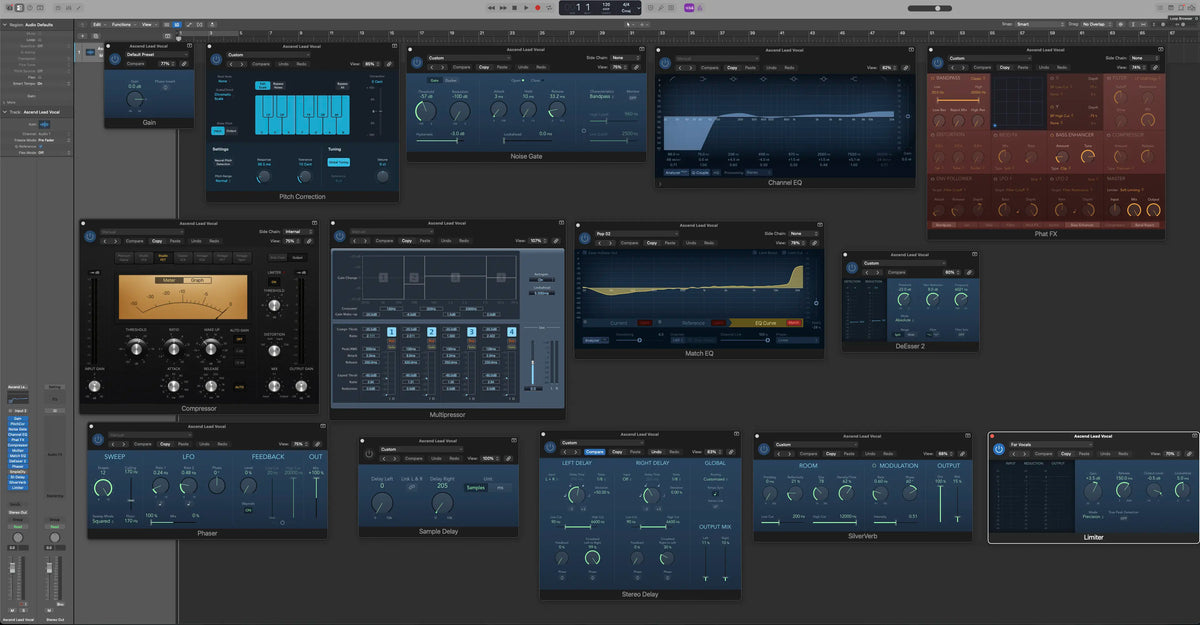
Getting a lead vocal to sound finished is the hardest part of a mix for most producers. Here is a complete, radio-ready lead vocal chain for Logic Pro, built entirely on stock plugins, that you can download free and load in one click. Check out the before & after audio demo above.
That is the same dry vocal included in the free download, before and after. The preset is called Ascend Lead Vocal: 14 Logic Pro stock plugins arranged into one Channel Strip Setting. No third-party plugins, no extra purchases. Below, we break down every plugin, every key setting, and the reasoning behind the order, so you are not just using it, you are learning from it.
What You Are Getting
Ascend Lead Vocal is a modern Hip-Hop, Pop, and R&B lead chain. It takes a raw, dry take to a bright, upfront, radio-ready vocal. The full chain, in signal order: Gain, Pitch Correction, Noise Gate, Channel EQ, Phat FX, Compressor, Multipressor, Match EQ, DeEsser 2, Phaser, Sample Delay, Stereo Delay, SilverVerb, Limiter.

Because we included a dry vocal in the download, you can load the preset and A/B the before and after immediately, with no need to find a test file.
Why the Order Matters
The reason this chain sounds finished instead of fighting itself is the order. It moves through six clear stages: clean it up, shape the tone, add weight, control the dynamics, polish and de-ess, then build width and lock the level. Corrective work happens before creative work. Dynamics happen before time-based effects. De-essing happens after the brightening that creates sibilance. Every plugin does one job, in the right place.
Stage 1: Prep the Signal
Gain
The chain opens with Gain at 0 dB. This is your input-staging slot. Set your level here so the vocal hits the rest of the chain consistently. If your recording is quiet, nudge it up a few dB; if it is hot, pull it down.
Pitch Correction
Tuning comes first, on purpose. Settings: Chromatic Scale, Response 36.5 ms, Tolerance 10 cents, Neural Pitch Detection on. That 10-cent tolerance is the secret. It leaves natural human pitch variation alone and only corrects real drift, so the tuning is transparent, not robotic. Doing it first means every plugin after it works on an in-tune signal.

Noise Gate
The gate clears dead air between phrases. Settings: Threshold -57 dB, fast 3 ms Attack, 33.2 ms Release, Hysteresis -3 dB, and crucially a Bandpass detector so the gate keys off the vocal's presence range instead of low rumble or high hiss. It cleans up silence without ever clamping the voice.

Stage 2: Shape the Tone
Channel EQ
A textbook modern-lead curve. A steep 96 Hz high-pass removes rumble and plosives. +4.5 dB at 206 Hz adds chest and body. -4 dB at 456 Hz pulls out boxiness and mud. Gentle presence lifts sit at 970 Hz and 2.5 kHz, and a bold +5.1 dB at 7.5 kHz brings air and sheen. Clean, present, open.

Phat FX
This is a signature move. The distortion is at zero, so this is not obvious grit. Instead, the Bass Enhancer and soft character add weight and harmonic thickness to the vocal before it hits the compressor, so the compressor has a richer, fuller signal to grab. It phattens the lead.

Stage 3: Control the Dynamics
Compressor
This is the Studio FET model, Logic's take on the classic 1176. It is fast and punchy, and that is what gives the vocal its upfront, in-your-face attitude. It handles the main broadband dynamic control and adds character.

Multipressor
The cleverest plugin in the chain. It is used as a dynamic EQ, not just glue. Look at the make-up gains: -20 dB on the sub band and -6 dB on the low-mids relentlessly control low-end buildup and proximity, the midrange is left at ratio 1.0 so the core of the voice stays completely natural, and only the highs are compressed to keep brightness smooth. It sculpts the spectrum dynamically while protecting the mids. This is why the vocal stays clean no matter how loud the performance gets.

Stage 4: Polish, Then Tame
Match EQ
Set to the Pop 02 reference and applied gently, Match EQ nudges the vocal's overall tonal balance toward a professional pop-vocal spectrum. That top-end sheen is the commercial polish, applied lightly so it stays natural.

DeEsser 2
Placed right after all that brightening on purpose. Settings: 6 kHz, up to 8 dB reduction, Split mode. The 7.5 kHz EQ boost and the Match EQ sheen accentuate sibilance, and this catches the harsh ess sounds they create. Placement is everything here. De-essing before the boosts would do nothing.

Stage 5: Width and Dimension
This stage adds depth and dimension. By default the Phaser, Stereo Delay, and SilverVerb are all on, giving the lead its warmth, echo, and space. The one effect that ships off is the Sample Delay, a stereo-width tool you switch on when you want it.
Phaser
Used in an unconventional way. The sweep is collapsed (Floor and Ceiling both at 170 Hz), feedback is at 0%, and Warmth is on. This is not a whooshing phaser. It is a barely-moving analog warmth and subtle-animation enhancer that adds life to the vocal without sounding like an effect.

Sample Delay
This one is off by default, a width tool for when you want it. Turn it on and the right channel is offset by 205 samples (about 4.6 ms) while the left stays at 0, a classic Haas trick that opens a mono vocal into real stereo width. Leave it off for a centered, mono-safe lead; switch it on when you want the vocal to spread across the stereo field.

Stereo Delay
This one is on by default, and it is what gives the lead its echo and movement. It is a band-limited 1/8-note delay at a low 10% mix with no feedback, so it is subtle depth and repeats, not an obvious slap. Use it as an arrangement tool: leave it on for verse-to-chorus movement and doubling energy, or switch it off and automate the mix any time you want a drier, more upfront lead. Toggle it per section and the vocal breathes with the song.

SilverVerb
A light, silky room at 15% wet, modulated for a gentle shimmer, and filtered (200 Hz to 12 kHz) so it never muddies the low end or hisses up top. Just enough space to sit the vocal in the mix without washing it out.

Pro Tip: Run the Delay and Reverb on a Bus (with Sidechain Ducking)
In this preset, the Stereo Delay and SilverVerb sit right on the channel strip for convenience: load one preset and everything is there. For an even cleaner, more controlled sound, move those two onto a dedicated bus (aux) set to 100% wet and feed them with a send from your vocal. That way you keep the dry vocal untouched, dial the exact amount of delay and reverb with the send level, and automate the space across the song: dry and tight in the verses, wider and wetter in the choruses. Leave the Sample Delay on the track, though, it is a width trick on the main signal, not a send effect.

Here is the move that makes it sound expensive: add a Compressor on the bus, after the delay and reverb, and set its sidechain input to your dry vocal. Now the wet effects duck out of the way while the vocal is singing and swell back up in the gaps between phrases. You get a big, lush space that never clouds the lead, the delay tails and reverb bloom exactly when the vocal rests. This ducking trick is behind a huge amount of professional-sounding vocals.

Stage 6: Finish
Limiter
The For Vocals setting: +3.5 dB gain, -0.5 dB ceiling, Precision mode. Final peak control so the vocal sits consistently hot and glued in the mix.

How to Install the Preset in Logic Pro
- Download the free preset and unzip it.
- Move the file into your Logic Pro Channel Strip Settings folder (Music/Audio Music Apps/Channel Strip Settings/Track).
- In Logic, select your vocal track, open the Channel Strip Settings menu at the top of the channel strip, and choose Ascend Lead Vocal. The whole chain loads in one click.
That is it. Drop it on, play your vocal, and adjust to taste.
Getting the Best Out of It
- Set the Gain first so your vocal hits the chain at a healthy level.
- Check the Gate threshold if your room is noisy, raise it slightly so it clears the noise floor cleanly.
- Turn on the Sample Delay for instant stereo width (it ships off for a clean, mono-safe lead).
- The Stereo Delay is on by default for movement; switch it off any time you want a drier, more upfront lead.
- Bus the delay and reverb with a sidechained compressor (see the pro tip above) for a lush space that ducks under the vocal.
- Presets are a starting point. This one gets you most of the way; small tweaks per vocal get you the rest.
Want the Full Collection?
Ascend Lead Vocal is one chain. The Infinity Suite for Logic Pro includes 130+ vocal chains plus 7,000+ total assets across mixing, mastering, and sound design, all built on Logic's stock plugins, for a one-time price with no subscription. If this free preset saved you time, the full suite is the next step.
FAQ
Is this preset really free? Yes, and it includes a dry vocal so you can test it instantly.
Do I need any third-party plugins? No. Every plugin in the chain is a Logic Pro stock plugin.
What Logic Pro version do I need? Logic Pro 10.4 or newer on a Mac.
What genre is it for? It is dialed for modern Hip-Hop, Pop, and R&B lead vocals, but it works as a strong starting point on most lead vocals.
Which effects are on by default? The Phaser, Stereo Delay, and SilverVerb are on, giving warmth, echo, and space. The Sample Delay (stereo width) ships off; turn it on when you want the vocal wider. You can also switch the Stereo Delay off for a drier lead.


